
BlockDistraction vs LeechBlock NG
A LeechBlock NG alternative with built-in Pomodoro
Manage distracting websites one rule at a time, then start a work/break cycle in the same browser. Try 10 rules and basic Pomodoro free, without an account.
Desktop Chrome, Firefox and Edge, plus supported Firefox and Edge versions on Android.
Published by the BlockDistraction developer. LeechBlock sources checked November 22, 2026. Setup preferences are our editorial judgment.
From a website rule to a work/break cycle
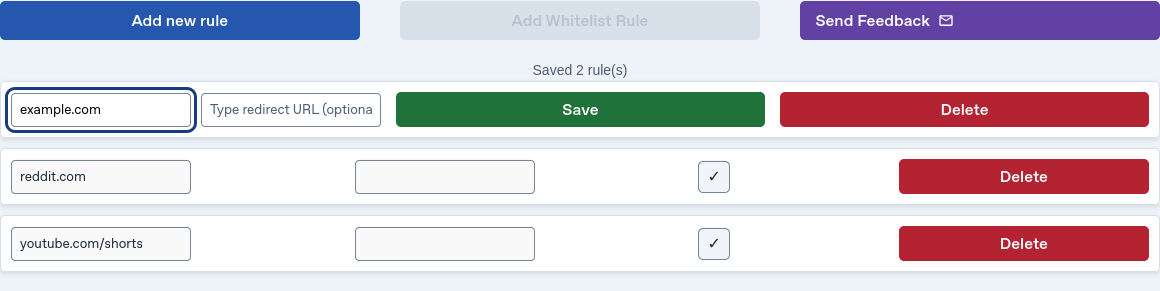
Add a domain or path, review its row, and choose Focus Session or Pomodoro when you want to concentrate. Pro keeps Schedule and Daily Limit controls next to the rule they affect.
A work/break routine you can start immediately
Choose Pomodoro in the Focus Session section. The free preset uses 25/5 intervals and four work sessions. Pro can change intervals and rounds, add long breaks and continue automatically. Hardcore protects work and breaks until the displayed end time.
Read the Pomodoro walkthrough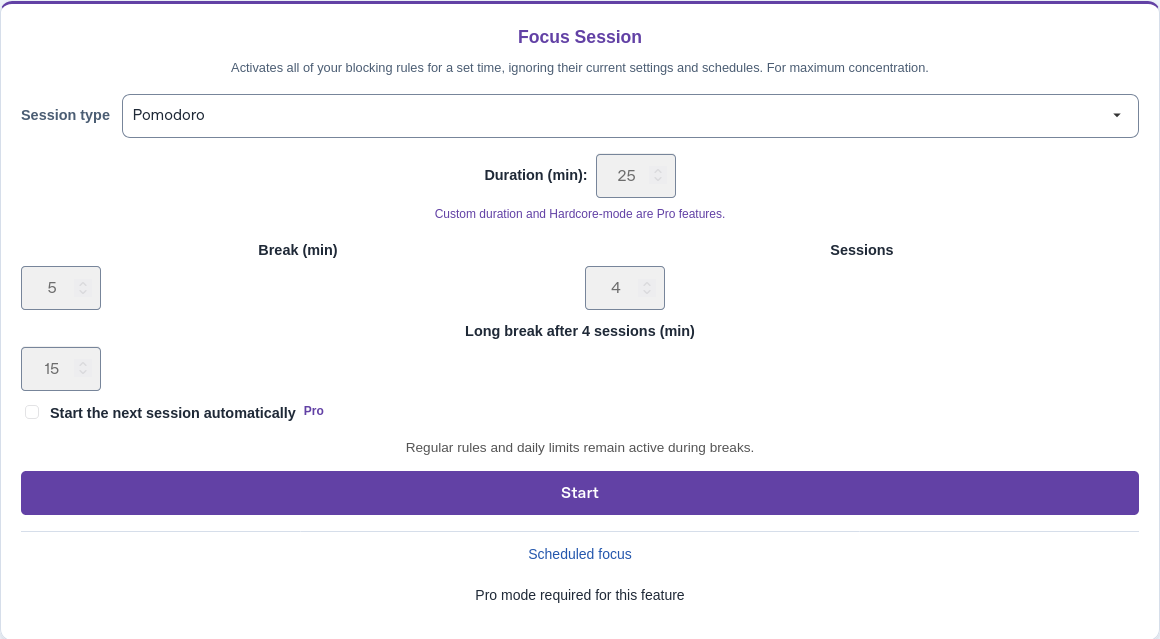
Controls in your language
BlockDistraction ships 57 locale packages, including Ukrainian and Japanese. LeechBlock currently lists nine languages in Chrome Web Store, without those two languages. Package locales and store language listings are different counts; check the language you need.
BlockDistraction vs LeechBlock NG
| What matters | BlockDistraction | LeechBlock NG |
|---|---|---|
| Free starting point | 10 rules, Strict Mode, 25-minute Focus Sessions and basic Pomodoro. | Free extension with up to 30 block sets containing site lists. A block set is not equivalent to one BlockDistraction rule. |
| Rule setup | Individual rule rows with an editor for Always, Schedule or Daily Limit. | Site lists in block sets, HHMM time ranges, and AND/OR options for combining periods and allowances. |
| Timing controls | Schedules and Daily Limits per rule require Pro. Pomodoro has a free preset and customizable Pro cycles. | Free schedules, time allowances, combinations of both, and timed Lockdown. |
| Firefox for Android | Supported. | Supported. |
| Privacy | Rules and browsing activity stay local. Optional technical diagnostics are off by default. | The developer states that no personal information is collected or transmitted. |
Choose BlockDistraction if you prefer its per-rule interface, translated controls and built-in Pomodoro workflow. LeechBlock already includes advanced timing for free; review the Pro boundary before moving a complex setup.
Local rules, with a published review
Tooltivity rated BlockDistraction 9.5/10 for Security & Privacy after reviewing version 5.6.12 on November 16, 2026. Read the review. The score describes that reviewed version; it is not a comparative privacy test against LeechBlock.
How to switch from LeechBlock NG
- List the domains, paths and working hours you actually use. Keep separate notes for exceptions and time allowances.
- Install BlockDistraction and recreate a few important rules manually. LeechBlock settings are not a BlockDistraction backup; do not upload them as one.
- Try a free Focus Session or Pomodoro. For schedules, Daily Limits or custom cycles, compare Pro features. One Pro key covers your supported desktop and Android browsers; each installation keeps its own timer and rules.
- Test the sites you intend to block and keep available, including during a Pomodoro break. Confirm the replacement works before removing your old setup.
Questions before switching
Will a Pomodoro break unblock every website?
No. Breaks restore your normal rules: Always rules still block, schedules follow their hours, and Daily Limits still apply. A break does not reset a spent daily budget.
Does this comparison include Firefox for Android?
Yes. Both extensions support Firefox for Android. BlockDistraction also provides an Edge Android setup guide. Browser blocking applies to pages that stay inside the supported browser, not separate Android apps.
Sources and further reading
Compare BlockDistraction with other website blockersTry the workflow with your own rules
Start free, check a few sites and complete one Pomodoro cycle. Choose Pro when custom cycles or advanced rule controls fit your routine.