 BlockDistraction
Pause vs Website Blocking: Which Focus Control Do You Need?
A pause gives you a moment to reconsider opening a website; website blocking keeps a matching address unavailable while a rule is active. Choose a Focus Session or Pomodoro for a work interval, and add Pro Hardcore when you want the extension’s normal stop and rule-editing controls locked until the session or cycle ends.
Published by the BlockDistraction developer. The controls below describe BlockDistraction 5.7.0 and later; a pause before each visit is a separate kind of tool.
Five controls with different jobs
| Control | What it does | BlockDistraction availability |
|---|---|---|
| Pause before opening | Interrupts a visit and lets you reconsider before continuing. | Use a dedicated pause tool; BlockDistraction does not provide this per-visit prompt. |
| Website blocking | Keeps matching website addresses blocked while their rules are active. | Free for up to 10 blocking or redirect rules. Pro adds schedules and Daily Limits. |
| Strict Mode | Adds a 10-second countdown before deleting a rule. | Free. This delay happens at rule deletion, not before every visit. |
| Focus Session / Pomodoro | Runs one work interval or a cycle of work intervals and breaks using your rules. | Free 25-minute sessions and a fixed 25/5 Pomodoro preset; Pro adds customization. |
| Hardcore Mode | Protects the session or whole Pomodoro cycle, including breaks, from normal cancellation and rule changes. | Pro. Check the displayed end time before starting. |
When a pause is useful
You open a news site out of habit, but sometimes you have a reason to read it. A pause before opening creates a decision point: continue deliberately or return to your task. That can fit a routine where you want to keep access available.
Research offers a reason to take that approach seriously. A 2023 study of the smartphone app one sec examined a combination of a waiting period, a message and an option to dismiss an opening attempt. A separate controlled experiment found that a time delay reduced consumption instances, while the option to dismiss had the strongest effect. These findings do not test BlockDistraction, establish that blocking is superior, or show that pauses universally fail when people are tired. Read the study and its limitations.
When to choose a blocking rule
If you have already decided that a site should be unavailable during a task, a blocking rule puts that decision into the browser. For example, block reddit.com while writing, or use a narrower rule such as youtube.com/shorts if you still need other YouTube pages.
Strict Mode adds friction at a different point: deleting that rule requires a 10-second countdown. It does not let you visit a blocked website after waiting 10 seconds, and it does not turn BlockDistraction into a per-visit pause tool. See the Strict Mode description before enabling it.
Pro schedules are useful for recurring hours. Pro Daily Limits suit a different decision: allow some daily browsing, then block after the allowance is used. Neither requires you to start a focus timer every time.
Use a Focus Session or Pomodoro for work and breaks
A Focus Session gives you one timed work interval. The free duration is 25 minutes. Pomodoro repeats work intervals with breaks: the free preset contains four 25-minute work sessions with 5-minute breaks between them, and you start each next work session manually.
- Add a blocking rule for a website that distracts you.
- Open BlockDistraction’s popup or Extension Settings and find the focus controls.
- Choose Focus Session for one work interval or Pomodoro for a work/break cycle.
- Start the free preset and work on one task. No account is needed.
A Pomodoro break ends the temporary focus override. Your normal rules, their schedules and Daily Limits still apply: an always-blocked site stays blocked, and a break does not reset a daily allowance. The cycle finishes after the final work session, without an extra timed break.
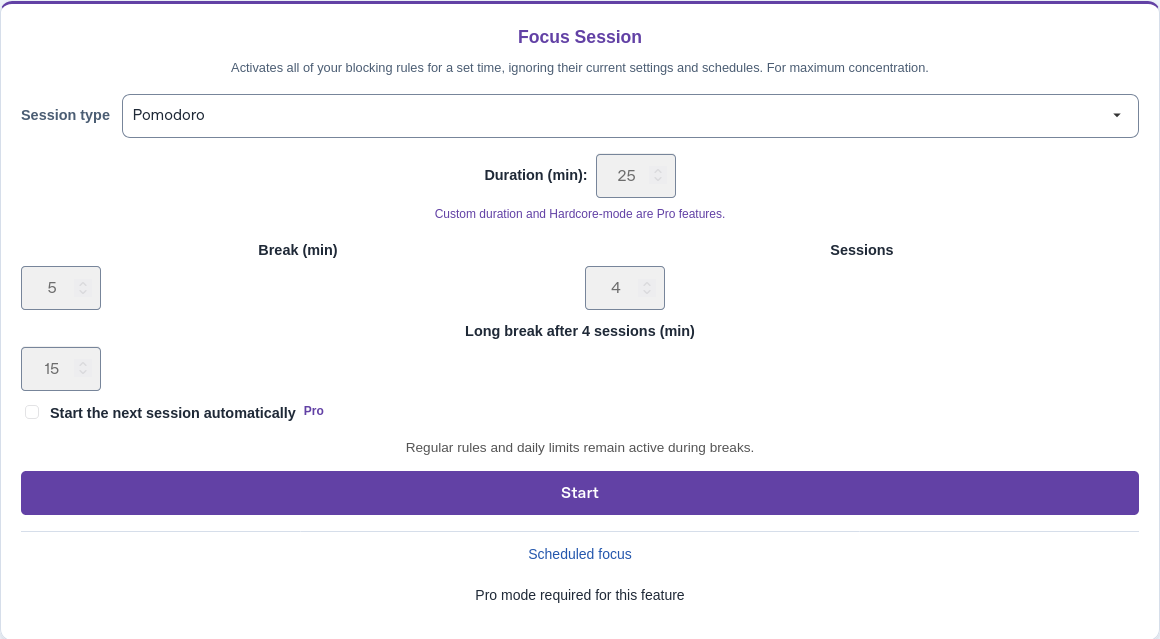
For the full controls and break behavior, follow the Pomodoro user guide or the work/break walkthrough.
Add Hardcore when you want to protect the timer
Pro Hardcore Mode prevents the extension’s normal controls from stopping the protected session or changing its rules before the end time. For Pomodoro, protection covers the entire cycle, including breaks, and requires automatic continuation. The lock on controls stays in place during a break even though normal blocking rules take over.
You can skip a Pomodoro break and start work early. That shortens the remaining cycle rather than canceling it. Check Locked until before starting, especially when choosing longer custom intervals. Restarting the browser does not clear the saved end time.
Hardcore operates within the extension. Someone who removes the extension, switches to another browser or opens a separate mobile app can leave that scope. It is a commitment control for your routine, not a device-management system.
Start with the decision you need to protect
- “I want to reconsider each visit.” Try a dedicated pause tool.
- “I want this site unavailable while its rule is active.” Use website blocking; add Strict Mode if a deletion countdown helps.
- “I need a work interval or repeated work and breaks.” Start with a free Focus Session or Pomodoro cycle.
- “I want the timer to run without a normal early-stop option.” Consider Pro Hardcore after checking the duration and end time.
BlockDistraction works in Chrome, Firefox and Edge on desktop, plus Firefox and Edge on Android. Website rules and site-usage data stay on your device; accounts, Pro license checks, payments and optional technical analytics have separate data flows described in the Privacy Policy.
Compare Free and Pro features and Pro plans when you need custom intervals, schedules, Daily Limits or Hardcore. One Pro key covers supported browsers and devices; it does not synchronize rules or timers between installations.
Source
Grüning, Riedel and Lorenz-Spreen (2023), Directing smartphone use through the self-nudge app one sec, PNAS. One of the authors developed the app. The study concerns that intervention, not a comparison with BlockDistraction.