Published by the developer of BlockDistraction. Official sources checked October 22, 2026. This is a comparison of documented capabilities, not an independent ranking or a benchmark.
Is this the right switch for you?
Consider BlockDistraction if…
Your distractions mostly happen in browser tabs.
You want browsing rules and usage data processed locally.
You prefer starting with a small, account-free setup.
You want one Pro key across supported browsers and devices.
BlockSite may suit you better if…
You rely on its separate mobile or desktop apps.
You value automatic account-based list sync in Chrome and Edge.
Your existing setup already meets your needs and its data choices are acceptable to you.
BlockDistraction vs BlockSite: the practical differences
Start with the features you actually use. A browser blocker and a separate app can cover different parts of your day.
Documented features and boundaries, checked October 22, 2026
What matters
BlockDistraction
BlockSite
Free starting point
10 blocking or redirect rules, Strict Mode and fixed 25-minute Focus Sessions. No account needed.
A free extension with Premium features. Its help centre lists Adult as the only free category; other categories require Premium. [1]
Working hours
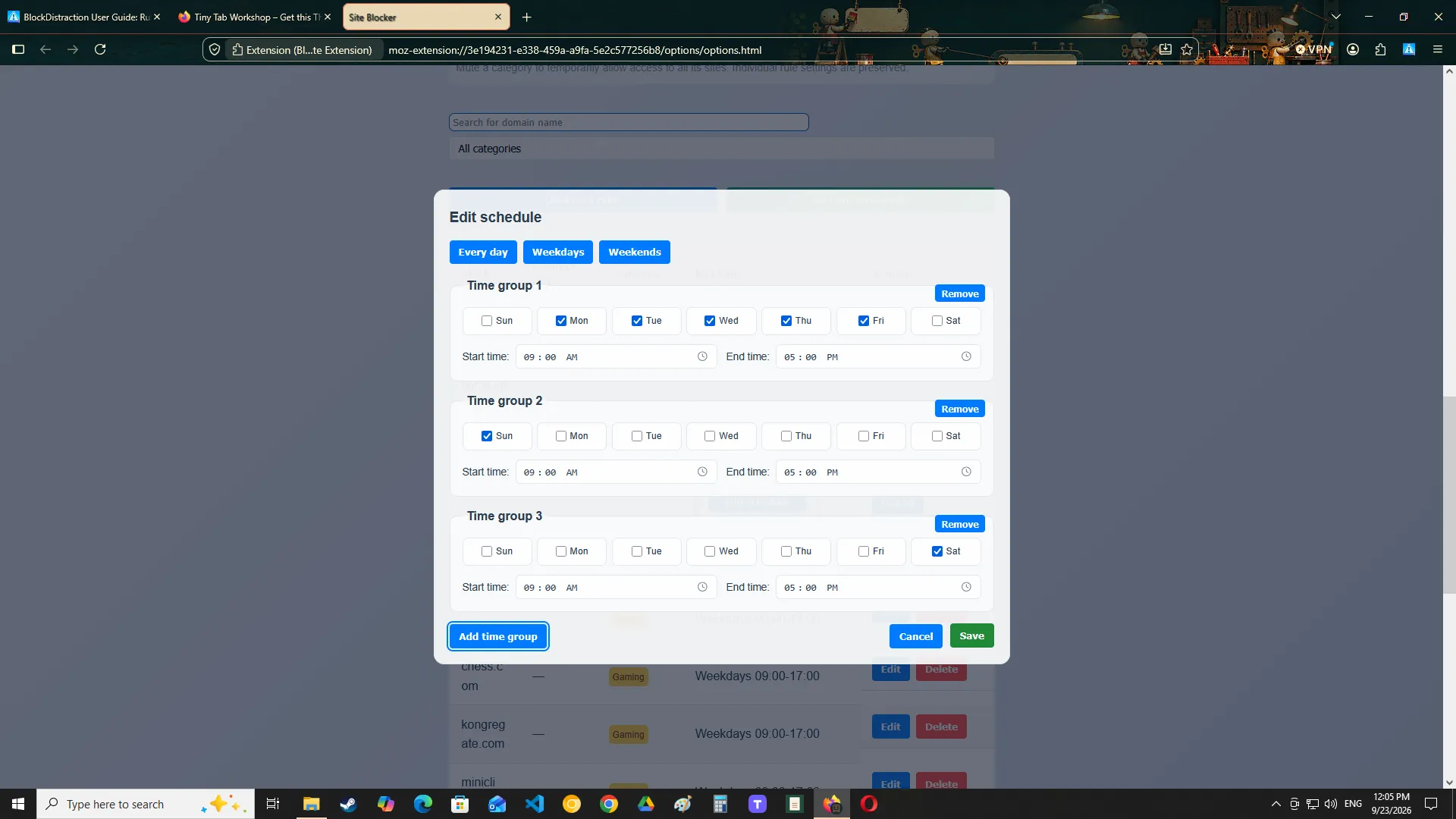
Per-rule schedules in Pro, with selected days and time ranges.
Advertises Schedule Mode. Check the current plan and platform. [2]
Browsing data
Rules and browsing decisions stay local. Optional technical analytics are off by default.
Its policy describes browsing-data collection and affiliate uses. Review the privacy comparison below.
Across browsers
One Universal Pro key for supported browsers and devices. Transfer rules manually with Pro export/import.
Automatic block-list sync in Chrome and Edge when signed in to a BlockSite account. [3]
Android
Runs inside supported Firefox and Edge browsers. Controls pages that stay in that browser.
Offers a separate mobile app. Confirm its current device requirements. [2]
Separate apps
Does not block installed apps or control the whole device.
Advertises app blocking through its separate apps. [2]
BlockDistraction's limit counts rules, including redirects. We do not quote a BlockSite free site-count allowance because the official sources checked did not establish a current number. Verify the allowance in your installed version before building a long list.
What “local rules” means for privacy
BlockDistraction: browser rules stay on your device
Blocked addresses, rule contents and Daily Limit usage are processed locally. Optional technical analytics and anonymous error reports are disabled by default and exclude browsing activity and rule contents. Pro license checks contact our server, and purchases use the website account and Paddle. The website has its own optional analytics consent. See our Privacy Policy for those boundaries.
BlockSite: review the data choices before enabling them
BlockSite's policy, updated July 16, 2026, describes collecting browsing data and disclosing it to affiliates for market intelligence, including onward disclosure to their customers. It discusses possible sale or sharing under U.S. privacy definitions while saying it does not disclose personal information for monetary compensation. Consent is obtained where legally required. The extension offers an opt-out, but the policy warns that some or all services may become unavailable.
The practical question is whether that data use fits your expectations for a website blocker. BlockDistraction is designed for people who want their rules and browsing activity kept local.
Rebuild the routine you already use
“Keep a few sites out of reach”
Start with Free. Recreate the domains or paths you use most, within the 10-rule limit. For example, a rule for youtube.com/shorts can target that path while leaving other YouTube pages available.
Use Pro schedules. Edit a rule, choose Schedule, select Monday–Friday and set 09:00–17:00. Save it, then check the blocked and allowed periods on your device.
Activate Pro, then transfer rules. Enter your Universal key in each supported browser and use Pro export/import for your BlockDistraction configuration. Lists do not update automatically between devices.
Write down what you want to keep. List the sites, allowed exceptions and working hours you currently rely on. Separate browser rules from controls for installed apps.
Install BlockDistraction in the browser you use. Start with Free and recreate a few important rules manually. This guide does not assume that a BlockSite export can be imported.
Recreate advanced controls if needed. Use Pro for schedules, Daily Limits or password protection. On another supported browser, activate the same Pro key and transfer a BlockDistraction backup manually.
Check the replacement before removing your old setup. Open each important website, check allowed exceptions and confirm which tool is blocking it. If you stop using a paid BlockSite plan, manage that subscription separately; installing another extension does not cancel it.
On Android, check where the link opens. A page that opens in a separate app is outside the extension's scope. Our browser vs app blocker guide explains the difference.
Questions before you switch
Is BlockDistraction a free BlockSite alternative?
For basic browser blocking, yes: Free includes up to 10 blocking or redirect rules, Strict Mode and fixed 25-minute Focus Sessions without an account. Schedules, Daily Limits, password protection and custom Focus Sessions require Pro. Compare the full Free and Pro feature list.
Will my lists sync automatically between browsers?
No. Rules and usage data stay local. A Universal Pro License lets you activate supported browsers with the same key; Pro export/import transfers your BlockDistraction configuration manually.
Can it replace my Android or iPhone app blocker?
It can replace browser rules in supported Firefox and Edge builds on Android. It does not control separate apps and is not an iPhone app blocker. Keep an app-level tool if that is where your distractions happen.
Can I try it before paying for Pro?
Yes. Install the free extension and test your main rules first. If you need Pro controls, review the current Monthly, Annual and Lifetime plans. A website account is used for purchasing Pro; the extension activates it with your license key.
Sources and comparison scope
Checked October 22, 2026 against official product pages, help articles and privacy disclosures. The switching steps describe how to recreate a setup; they do not claim a measured speed advantage or a tested BlockSite import. Recheck current plans and platform support before purchasing.
We use Google Analytics and Microsoft Clarity to understand website traffic and usage. Optional analytics cookies and storage are enabled only if you accept. Learn more.
 BlockDistraction